 BRIDGE1

Reference Mac: Apple M1 Max · 32-core GPU · 64 GB. Decode is engine-reported tokens per second; other Macs are not measured.
4-bit
Qwen3.8 27B
- Engine
- MLX
- Download
- 16.1 GB
- Admitted window
- 131,072 tokens
- Memory: measured or estimated
- 55.4 GB · estimated
- Measured depth and window estimate
- Measured to 82,541 tokens (39.1 GB peak, M1 Max 64 GB). The 131,072-token window is estimated at 55.4 GB.
- Short decode
- 20.0–20.7 tok/sconditions not recorded
- Decode at depth
- 20.8 tok/sconditions not recorded
- SWE-bench Verified (base weights)
- not measured
- Catalog date
- 2026-10-09
GGUF UD-Q4_K_S
Qwen3.8 27B
- Engine
- GGUF / llama.cpp
- Download
- 15.4 GB
- Admitted window
- 262,144 tokens
- Memory: measured or estimated
- 41.8 GB · estimated
- Short decode
- not measured
- Decode at depth
- not measured
- SWE-bench Verified (base weights)
- not measured
- Catalog date
- 2026-10-09
Qwen describes this as a dense 27B model and lists a native context of 262,144 tokens. Its extension instructions describe a larger window, but they do not establish what Bridge1 admits for either profile.
Bridge1’s MLX 4-bit row admits 131,072 tokens on the reference Mac, half the native window. The GGUF UD-Q4_K_S row admits 262,144. Read the selected profile’s window in Bridge1; the upstream limit alone is not a memory budget.
Choose something else when your Mac cannot leave room for these profiles alongside your working apps. If your priority is the catalog’s coding default rather than this dense model, check Ornith’s profiles in the model catalog next.
Common scale: 0–262,144 tokens
Native model window: 262,144 tokens; MLX admitted window: 131,072 tokens; GGUF admitted window: 262,144 tokens.
Measured to 82,541 tokens (39.1 GB peak, M1 Max 64 GB). The 131,072-token window is estimated at 55.4 GB.
The MLX download is 16.1 GB. The catalog’s reference Apple M1 Max has a 32-core GPU, and its figures are dated 2026-10-09; they are not predictions for another Mac.
GGUF has a 15.4 GB download and a 41.8 GB memory estimate at 262,144 tokens. That longer window with a smaller estimated footprint is a reason to investigate the profile, not proof that the two builds have equal memory behavior or coding quality.
GGUF speed is not measured; its short and depth cells remain empty of rates. MLX’s recorded decode figures are output-generation rates, with conditions not recorded, and do not measure the wait to read your prompt or finish a task.
Common scale: 0–60 GB
Qwen3.8 27B
4-bit · MLX
- Download size
- 16.1 GB
- Catalog memory estimate
- 55.4 GB estimated
- Measured peak at this window
- not measured
- Admitted window
- 131,072 tokens
Catalog date:
Qwen3.8 27B
GGUF UD-Q4_K_S · GGUF / llama.cpp
- Download size
- 15.4 GB
- Catalog memory estimate
- 41.8 GB estimated
- Measured peak at this window
- not measured
- Admitted window
- 262,144 tokens
Catalog date:
MLX has a 16.1 GB download and 55.4 GB estimated memory at 131,072 tokens. GGUF has a 15.4 GB download and 41.8 GB estimated memory at 262,144 tokens.
Use the admitted window and the evidence for this profile when deciding what fits your work.
The Qwen3.8 27B GGUF UD-Q4_K_S profile runs through llama.cpp. The catalog estimates 41.8 GB at a 262,144-token window on the reference Apple M1 Max, 32-core GPU, 64 GB. Its download is 15.4 GB. These figures do not establish the window available on another Mac.
Memory at conversation depth: not measured. Decode, both short and at depth: not measured. Time to first reply: not measured. Loading a model with this context limit does not establish a conversation reaching that depth. MLX timings do not predict GGUF speed.
Vision is listed as Yes for this exact catalog profile. That capability does not establish an image or coding-task result in every client. Choose the GGUF row before copying Gateway settings, then check the window Bridge1 offers on your Mac.
In Bridge1, select Qwen3.8 27B and check whether the row says MLX 4-bit or GGUF UD-Q4_K_S. Keep that choice fixed while copying Gateway settings. Route1 follows the model selected in Bridge1, so a later selection changes what the alias targets.
The two row images identify the profiles and the app’s context controls. Use the chart’s measured and estimated labels when budgeting memory, rather than a cold-start estimate printed in the app.
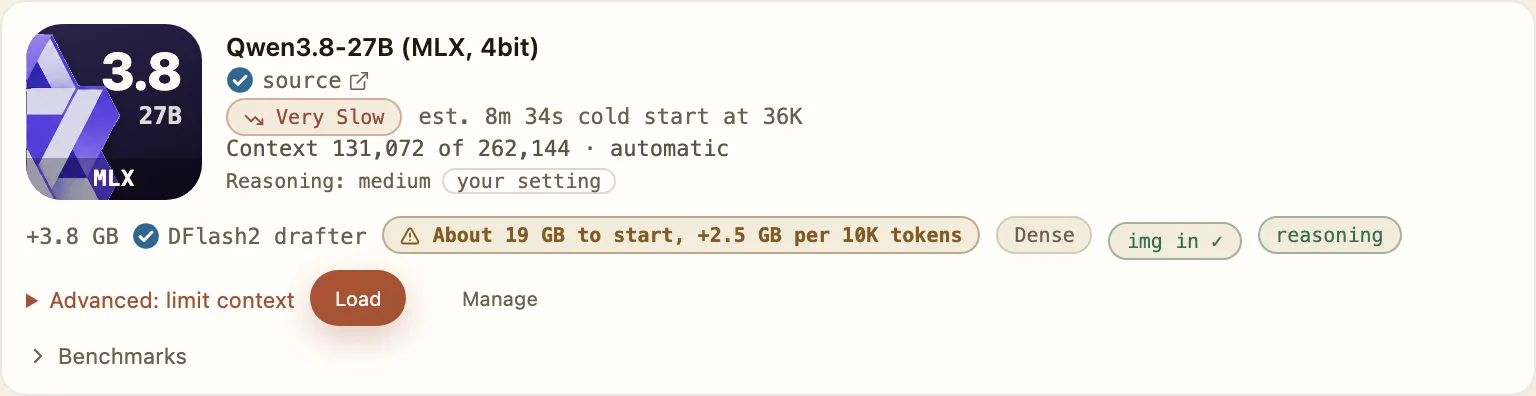
Swipe to see the whole row
Read the automatic context limit and approximate memory pill separately from the estimated 55.4 GB at the window in the chart above.
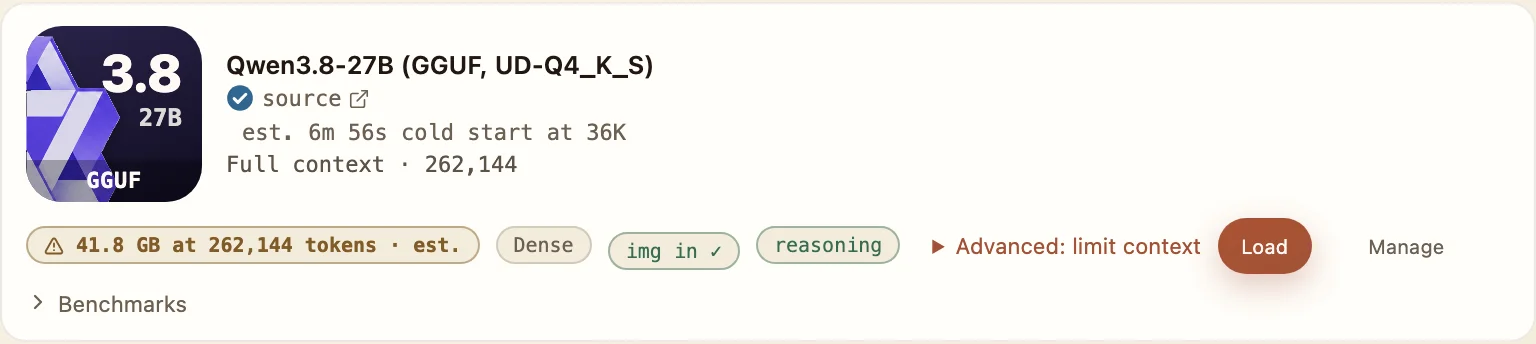
Swipe to see the whole row
The GGUF memory pill says “est.”; it is an estimate at the displayed window, not a measured peak.
As of 2026-09-26, Bridge1’s published evaluation records 39 of 40 small-repository coding tasks for Qwen3.8 27B, the reference model. The tasks ran through Claude Code on small Python repositories with hidden tests.
Use that result to decide whether a small, testable coding change is worth trying. It does not establish a separate pass rate for MLX and GGUF, or the same outcome through every client. Test the behavior you need before moving a large project onto it.
The original Qwen page, MLX Community 4-bit conversion and Unsloth GGUF page each declare Apache-2.0. Their links below were accessed 2026-10-19; the declarations apply to the respective pages.
On macOS, bridge1 launch starts Claude Code, Codex, OpenCode or Pi with Bridge1, subject to the installed client version, model availability and loading settings; the manual steps still work. Open Gateway’s OpenCode setup and merge the generated provider entry into your configuration. Keep the model name, attachment and modalities values supplied for this profile. The example below shows the guide’s connection values with a placeholder key.
Review the OpenCode guide’s compaction and prompt-reread limits before a long chat. The other client guides follow in the same order as Bridge1’s client list; changing clients does not increase the admitted model window.
// Add this "bridge1" entry to the "provider" object in ~/.config/opencode/opencode.jsonc,
// and set "model" to "bridge1/route1"
"bridge1": {
  "npm": "@ai-sdk/openai-compatible",
  "name": "Bridge1",
  "options": {
    "baseURL": "http://127.0.0.1:54321/v1",
    "apiKey": "YOUR-GATEWAY-KEY"
  },
  "models": {
    "route1": {
      "name": "route1",
      "attachment": true,
      "modalities": {
        "input": [
          "text",
          "image"
        ],
        "output": [
          "text"
        ]
      },
      "limit": {
        "context": 262144,
        "output": 32768
      }
    },
    "mtp-qwen3.6-35b-a3b-gguf": {
      "name": "mtp-qwen3.6-35b-a3b-gguf",
      "attachment": true,
      "modalities": {
        "input": [
          "text",
          "image"
        ],
        "output": [
          "text"
        ]
      },
      "limit": {
        "context": 262144,
        "output": 32768
      }
    }
  }
}These OpenCode connection values use a placeholder key. Merge the complete provider entry from Gateway into your OpenCode configuration; keep its generated model and context fields.
OpenCode setup
- Select this model in Bridge1. Merge Gateway’s generated bridge1 provider entry into your OpenCode configuration and select bridge1/route1 or its supplied plain model id.
- Keep attachment and modalities fields when supplied. Check compaction and prompt-reread limits in the OpenCode guide before a long chat.
Pi.dev setup
- Copy Gateway’s custom-provider JSON for the chosen model and verify the model selection before use.
- Keep input, contextWindow and maxTokens when supplied. Early support covers one short smoke-test turn; follow the Pi.dev guide for the current setup.
Codex setup
- Save Gateway’s generated provider configuration with wire_api set to responses and a base URL ending in /v1.
- Use route1 or the plain model id supplied by Gateway. For Codex Desktop, use the same configuration, then quit and reopen the app.
Hermes Agent setup
- Add a custom endpoint with Gateway’s URL, your non-blank key and route1 or the supplied plain model id. Use Test, then Save.
- Preserve generated vision and context values, including supports_vision when supplied. Early support covers a single smoke-test turn.
Claude Code setup
- Copy the Claude Code launch command from Gateway and run it in your project folder with your own gateway key.
- Keep claude-route1, timeout values and any extra context setting generated for the selected window. Use the guide to review Auto mode limits.
Claude Desktop setup
- Download config.json from Gateway, enable Developer Mode and open Configure Third-Party Inference; choose New → Import in the configurations switcher and select the file.
- Select the Bridge1 configuration, restart Claude Desktop and use Test connection. Review Code tab timeouts before a long prompt.