 BRIDGE1

Reference Mac: Apple M1 Max · 32-core GPU · 64 GB. Decode is engine-reported tokens per second; other Macs are not measured.
mxfp4 · editor's choice
Qwen3.6 35B-A3B
- Engine
- MLX
- Download
- 19.3 GB
- Admitted window
- 229,376 tokens
- Memory: measured or estimated
- 55.2 GB · estimated
- Measured depth and window estimate
- Measured to 131,443 tokens (39.1 GB peak, M1 Max 64 GB). The 229,376-token window is estimated at 55.2 GB.
- Short decode
- 94.8–98.6 tok/sconditions not recorded
- Decode at depth
- 47.1 tok/sconditions not recorded
- SWE-bench Verified (base weights)
- 73.4 creatorconditions not recorded
- Catalog date
- 2026-10-09
GGUF UD-Q3_K_M
Qwen3.6 35B-A3B MTP
- Engine
- GGUF / llama.cpp
- Download
- 17.1 GB
- Admitted window
- 262,144 tokens
- Memory: measured or estimated
- 27.0 GB · estimated
- Short decode
- 55.6–63.1 tok/sconditions not recorded
- Decode at depth
- 35.0 tok/sconditions not recorded
- SWE-bench Verified (base weights)
- not measured
- Catalog date
- 2026-10-09
Select Qwen3.6 35B-A3B, MLX mxfp4, in Bridge1. Check memory before loading it. The catalog marks this profile as an Editor’s Choice; it is not the default coding model.
The 35B name counts all parameters. Qwen reports about 3B active parameters per token, but that smaller active count does not make this a 3B-sized download or memory footprint.
Swipe to see the whole row
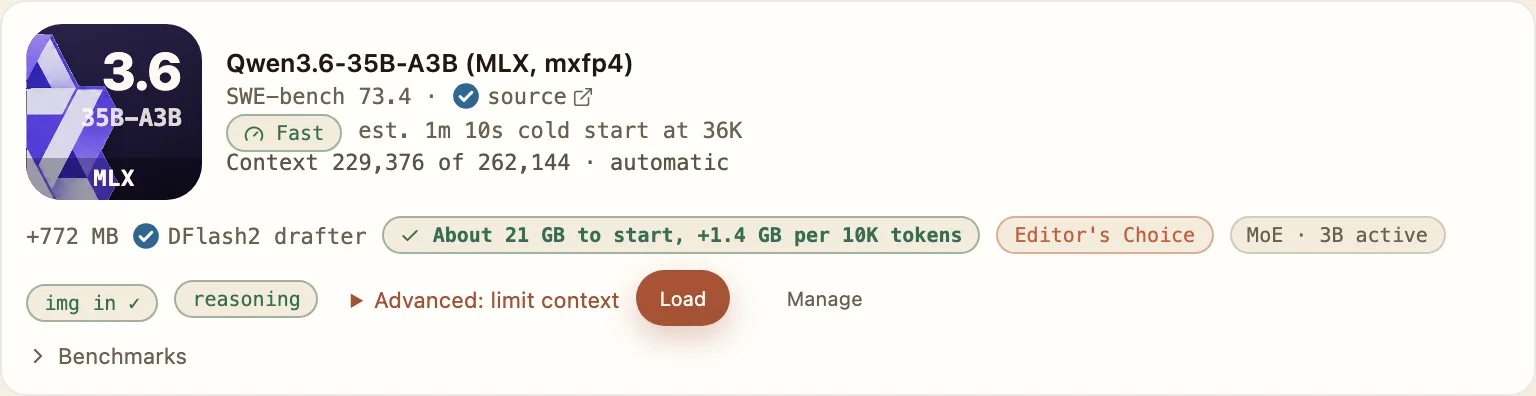
The memory pill gives approximate start memory and growth; the context label shows an automatic limit of 229,376 out of 262,144 tokens.
Measured to 131,443 tokens (39.1 GB peak, M1 Max 64 GB). The 229,376-token window is estimated at 55.2 GB.
The catalog is dated 2026-10-09. The reference Apple M1 Max has a 32-core GPU. Your Mac’s memory budget can admit a different window.
Model weights stay in memory while attention state grows with the conversation. Leave room for macOS and your coding client as well. Do not subtract the 19.3 GB download from 55.2 GB and call the difference a measured cache size: those numbers describe different things.
Figure 1 shows the app’s approximate memory labels: about 21 GB to start, plus 1.4 GB per 10K tokens. These approximations are not measurements. Figure 2 labels the 55.2 GB figure at the default window as estimated; it does not predict a safe chat length for a smaller Mac.
Choose a smaller catalog model when keeping your editor and other apps open leaves too little memory for this profile’s admitted window. On a 32 GB Mac, the 64 GB reference result is a reason to reduce the window or choose less demanding weights, not a promise that the same long chat will fit.
Common scale: 0–60 GB
Qwen3.6 35B-A3B
mxfp4 · editor's choice · MLX
- Download size
- 19.3 GB
- Catalog memory estimate
- 55.2 GB estimated
- Measured peak at this window
- not measured
- Admitted window
- 229,376 tokens
Catalog date:
The GGUF build
GGUF UD-Q3_K_M · GGUF / llama.cpp
- Download size
- 17.1 GB
- Catalog memory estimate
- 27.0 GB estimated
- Measured peak at this window
- not measured
- Admitted window
- 262,144 tokens
Catalog date:
The MLX download is 19.3 GB; its admitted window is 229,376 tokens, with estimated memory of 55.2 GB at that window. The app’s approximate start memory and growth labels appear in figure 1. Download size and running memory describe different quantities.
On macOS, bridge1 launch starts Claude Code, Codex, OpenCode or Pi with Bridge1, subject to the installed client version, model availability and loading settings; the manual steps still work. Open the Gateway panel after selecting the model. Copy the setup for your client, including the generated model name and context settings. Route1 follows the model selected in Bridge1; use the native name supplied there when you want to target one model directly.
For Claude Code, the base URL is http://127.0.0.1:54321, without a /v1 suffix. The command below comes from the Claude Code setup guide and uses a placeholder key. Copy Gateway’s full command for your selected model, including its extra context setting for windows of 100,000 tokens or more. OpenCode and Codex use a base URL ending in /v1; follow their guides below.
ANTHROPIC_BASE_URL="http://127.0.0.1:54321" \
ANTHROPIC_API_KEY="YOUR-GATEWAY-KEY" \
ANTHROPIC_MODEL="claude-route1" \
API_TIMEOUT_MS="1800000" \
CLAUDE_STREAM_IDLE_TIMEOUT_MS="2400000" \
CLAUDE_CODE_DISABLE_NONSTREAMING_FALLBACK="1" \
ANTHROPIC_CUSTOM_HEADERS="X-Bridge1-Client: claude-code" \
claudeThis example uses claude-route1 and a placeholder key. Copy the complete Gateway command for your selected model to keep its timeout and context settings.
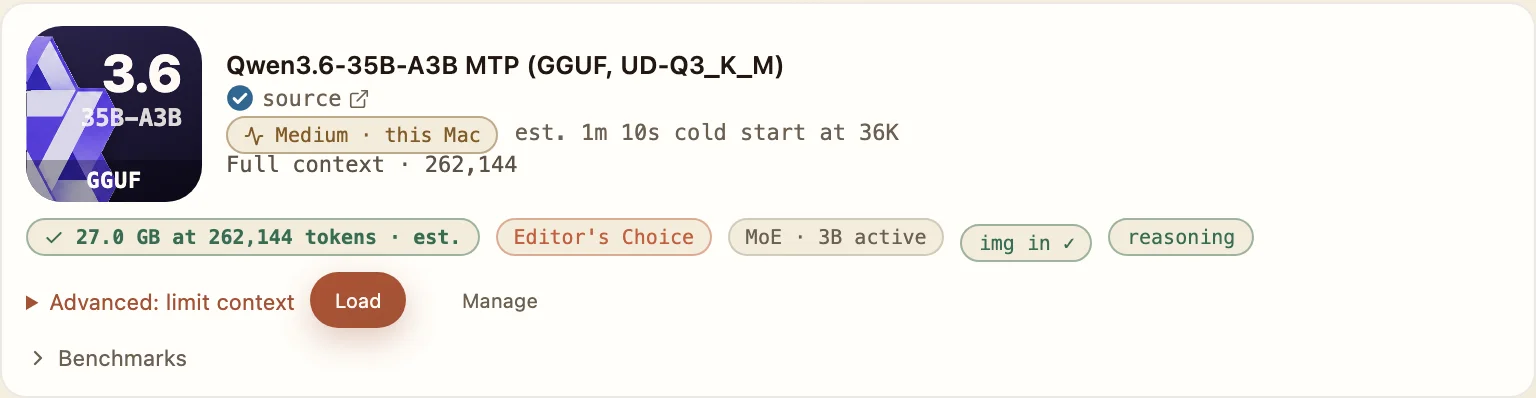
The GGUF UD-Q3_K_M build runs through llama.cpp. It is a separate choice in Bridge1: 17.1 GB on disk, a 262,144-token admitted window and 27.0 GB estimated memory on the reference Mac.
Consider this build when its smaller catalog memory estimate fits your budget better. Keep the estimated label in view. It is not a measured 27 GB requirement, and the build’s name alone does not establish a speed advantage or equal coding quality between the two quantizations.
Swipe to see the whole row
The memory pill marks 27.0 GB at 262,144 tokens as estimated.
As of 26 September 2026, Bridge1’s published task evaluation recorded 38 passes out of 40 for Qwen3.6 35B-A3B through Claude Code. Those were small Python repositories, with hidden tests; the result does not establish the same behavior in a large project or every client.
The catalog’s decode figures measure output generation. They do not include the whole wait to read a long prompt or finish a coding task. Use the Speed page for that distinction and the Evidence page for the test conditions; the key facts above preserve missing conditions rather than turning token rates into a response-time promise.
Qwen’s original model page declares Apache-2.0. The MLX Community mxfp4 page and Unsloth GGUF page each declare Apache-2.0 too. The three linked references identify those artifacts separately, accessed 2026-10-19.
OpenCode setup
- Merge the generated bridge1 provider entry into your OpenCode configuration and select bridge1/route1 or its supplied plain model id.
- Preserve attachment and modalities fields when present. OpenCode cannot see token usage in Bridge1 replies yet, so keep an eye on long chats instead of relying on automatic compaction.
Pi.dev setup
- Early support covers one short smoke-test turn only. Copy the generated custom-provider JSON and verify the chosen model before use.
- Preserve input, contextWindow and maxTokens when supplied; without contextWindow, Pi assumes 128,000 tokens.
Codex setup
- Copy the generated provider configuration. Keep wire_api set to responses and the base URL ending in /v1.
- Use route1 or the plain model id shown by Gateway. For Codex Desktop, save the same provider configuration as the CLI, then quit and reopen the app.
Hermes Agent setup
- Early support covers one smoke-test turn only. Add a custom endpoint with the Gateway values, then Test and Save.
- Keep the generated vision and context values. Without supports_vision, Hermes sends a text description of an image instead of the image.
Claude Code setup
- Select this model for Route1, then copy the Claude Code launch command from Gateway and run it in your project folder with your own gateway key.
- Keep claude-route1, the generated timeout settings and the extra context setting included for windows of 100,000 tokens or more.
Claude Desktop setup
- Download config.json from Gateway and import it with New → Import in Claude Desktop’s configurations switcher. Select Bridge1, restart and use Test connection.
- The Code tab can give up after about 13 minutes without visible output. Its first step on a new prompt rereads the chat: about 2.5 minutes at 53K tokens was observed on Qwen3.6 35B-A3B; later steps reused it.