 BRIDGE1

Read a catalog row as an address for one offered choice. The model name identifies the family or named release. The profile distinguishes the particular build and precision. The engine column tells you which runtime path the offered profile uses. Keep all of them together when moving from the catalog to a model guide or to the selection in Bridge1.
Qwen3.8 27B is a useful example because its guide contains an MLX four-bit profile and a GGUF UD-Q4_K_S profile. The shared model name helps you find the guide; the different profile labels tell you which section applies. Copying the MLX memory figure into notes about the GGUF choice would lose the very distinction that the profile label is there to preserve.
The catalog table below keeps those choices side by side without declaring a winner. Read across one row before reading down a column. Check the offered window, running-memory label and image support with the profile name still in view. If you cannot tell which row a claim describes, do not use that claim to decide what to download.
Common scale: 0–60 GB
Qwen3.8 27B
4-bit · MLX
- Download size
- 16.1 GB
- Catalog memory estimate
- 55.4 GB estimated
- Measured peak at this window
- not measured
- Admitted window
- 131,072 tokens
Catalog date:
Qwen3.8 27B
GGUF UD-Q4_K_S · GGUF / llama.cpp
- Download size
- 15.4 GB
- Catalog memory estimate
- 41.8 GB estimated
- Measured peak at this window
- not measured
- Admitted window
- 262,144 tokens
Catalog date:
The catalog keeps download size, memory and context together, with estimates distinguished from measured depth.
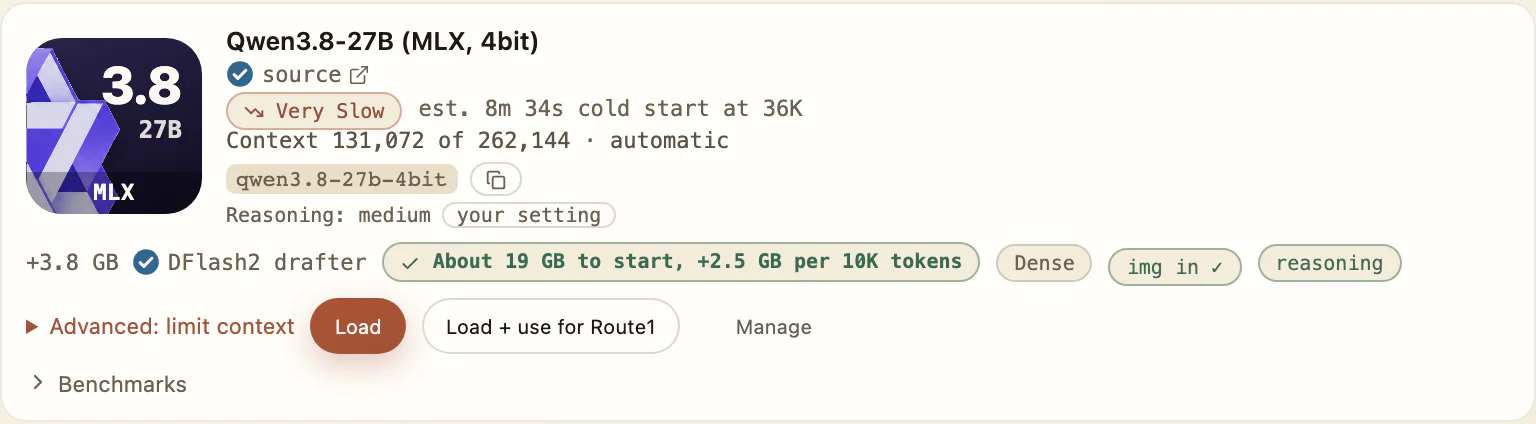
Swipe to see the whole row
The full profile name and MLX badge identify this offered choice. The reasoning setting belongs to the capture machine.
MLX is a framework used for machine learning on Apple silicon. GGUF is a model file format used by llama.cpp. That distinction matters because a format label and a framework name are not two settings on one universal scale. Bridge1 offers catalog profiles through its supported engines; the catalog, rather than a filename found elsewhere, defines the available choice.
A GGUF label tells you something about the artifact’s format. It does not by itself establish which features a particular runtime exposes to your client. Likewise, an MLX label does not promise every feature associated with the upstream model family. Check the selected profile’s published capabilities and the client guide before expecting image input or coding actions.
You do not need to convert a model to follow this decision. Choose an offered profile and use its documented path. This article does not describe importing arbitrary artifacts or changing engine settings. If you are comparing two supported profiles, the useful question is which has the documented capabilities and fit for your task, rather than which format name sounds more familiar.
Quantization reduces the precision used to represent model weights. The public profile label helps distinguish the resulting artifact, but a short label cannot describe every choice involved in producing it. Two profiles with similar precision names need not have identical sizes, memory requirements or answers. Treat the full label as identity, rather than as a portable quality score.
An MLX four-bit label and a GGUF label containing Q4 both indicate reduced-precision choices, but they are not a promise of bit-for-bit equivalence. Do not translate a memory estimate or benchmark result from one to the other. The same caution applies within a format: keep suffixes such as UD-Q4_K_S attached to the exact catalog profile instead of shortening them until distinct choices look identical.
A precision number also does not count the complete memory needed for a coding session. Conversation growth and runtime overhead still matter. If your reason for selecting a profile is memory fit, read the running-memory estimate at its admitted window, then check the window offered on your Mac. The linked memory article explains why a smaller model file cannot settle that question.
The Qwen3.8 MLX profile has a recorded measurement and a separate window estimate. Measured to 82,541 tokens (39.1 GB peak, M1 Max 64 GB). The 131,072-token window is estimated at 55.4 GB. That wording cannot be applied to the GGUF profile, even though both sit in the same model guide. The GGUF choice has its own catalog values and evidence limits.
The reference windows describe the 64 GB M1 Max. They do not establish what a different Mac can admit, and a long advertised model context is not the same as a long measured conversation. If you need a particular depth, look for the evidence that actually reaches it. A missing result stays not measured; do not fill the gap with a calculation presented as an observation.
For speed, use the published speed and benchmark pages with their conditions. Do not rank formats using unlike prompt lengths, Macs or task types. A short decode result and a long-chat wait answer different questions. Where the catalog suppresses a speed figure because its conditions are not recorded, that absence is a reason to withhold a speed conclusion.
Make the task concrete before choosing a precision. A short explanation, an image question and a sequence of file edits ask for different capabilities. Read the catalog’s image support for the selected profile. Read its model guide for known coding failures and the scope of task evidence. Neither a format name nor a family-level score establishes that your chosen profile can complete the work.
Keep client support separate too. The setup guide tells you how the client connects and which settings must be retained. The model guide tells you the limits of the model choice. A configured client does not remove model-specific failures, and a model with image support does not prove that every client will send an attachment in the form you expect.
When the task requires a feature that is not documented for the selected profile, choose a documented alternative or narrow the task. Do not infer the missing capability from another build with the same model name. This is especially useful when comparing MLX and GGUF rows: a similar label can make it tempting to borrow evidence that belongs to the other row.
After choosing a row, open the corresponding model guide and select that profile in Bridge1. Check the window offered for your Mac before copying the connection details. Keep the generated client settings associated with that choice, especially the context and image capability fields where supplied. Use the canonical setup guide for your client rather than combining examples from different clients.
For the supported macOS terminal paths, the launcher can handle session connection setup for Claude Code, Codex, OpenCode or Pi.dev, subject to the installed client version, model availability and loading settings. It does not make every version compatible or prove a coding task passed. Desktop and manual paths remain governed by their own setup guides; do not infer a launcher from a shared client family name.
Run a small, bounded check before committing a real project to the selection. Confirm the provider and model, ask an ordinary harmless question, and check actual file work separately if that is your intended use. If you switch profiles, repeat the relevant checks for the new choice. A previous successful response belongs to the profile and client combination that produced it.
Before asking someone else to interpret a label, retain the whole public name and profile. A note saying Qwen3.8 four-bit can leave the engine choice unclear; a note naming the catalog profile and its guide section is easier to assess. Add the client and the task you want to do, such as text explanation or file editing. That gives the capability and fit questions a concrete subject without requiring a guess about what a shortened filename was intended to identify.
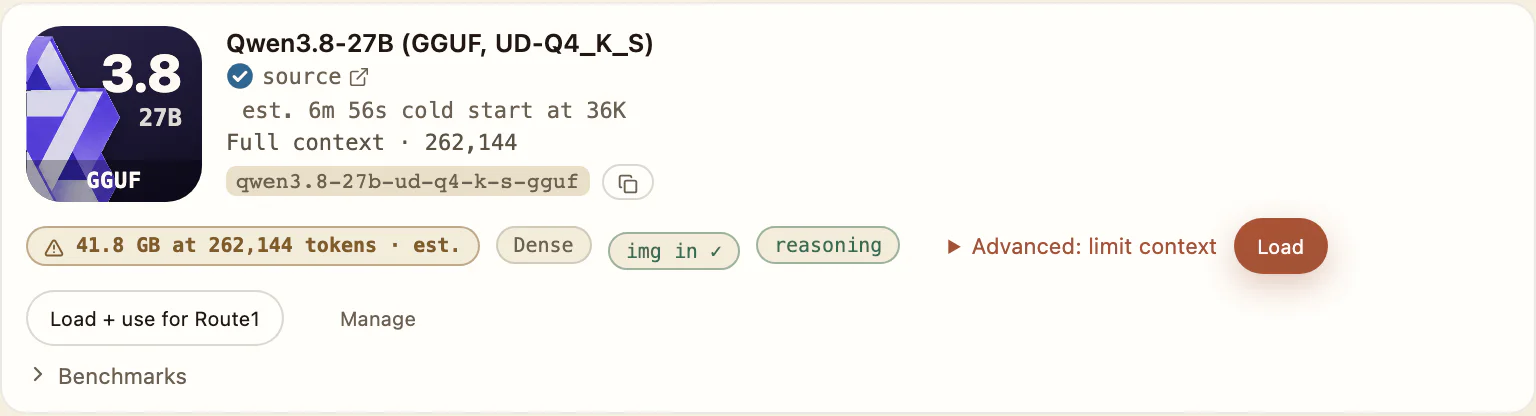
Swipe to see the whole row
The same model has a distinct GGUF profile label, window and estimated-memory pill.
Reference Mac: Apple M1 Max · 32-core GPU · 64 GB. Decode is engine-reported tokens per second; other Macs are not measured.
4-bit
Qwen3.8 27B
- Engine
- MLX
- Download
- 16.1 GB
- Admitted window
- 131,072 tokens
- Memory: measured or estimated
- 55.4 GB · estimated
- Measured depth and window estimate
- Measured to 82,541 tokens (39.1 GB peak, M1 Max 64 GB). The 131,072-token window is estimated at 55.4 GB.
- Short decode
- 20.0–20.7 tok/sconditions not recorded
- Decode at depth
- 20.8 tok/sconditions not recorded
- SWE-bench Verified (base weights)
- not measured
- Catalog date
- 2026-10-09
GGUF UD-Q4_K_S
Qwen3.8 27B
- Engine
- GGUF / llama.cpp
- Download
- 15.4 GB
- Admitted window
- 262,144 tokens
- Memory: measured or estimated
- 41.8 GB · estimated
- Short decode
- not measured
- Decode at depth
- not measured
- SWE-bench Verified (base weights)
- not measured
- Catalog date
- 2026-10-09